Archive for September, 2008
Life Without Walls. Just Windows then?
Last night Microsoft launched their new, “I’m a PC“, advert which is more a comeback from the Apple “Mac vs PC” adverts. It really dirves the point home compared to the recent “Seinfeld and Gates” adverts. It seems that PC users are not at all like what Apple would like us to believe. Some are even worthy of pinning up on your bedroom wall!
The one thing that I dont get about this new campaign is the slogan at the end of the ad where it says “Life without walls”. Well if you’ve got no walls then where are you gona put the Windows?
Brinknoish?
Some of you may have noticed our logo change today and some may have noticed some visual muck-ups, but today our friend over at Brinkhurst Design added our new logo to the site and made some modifications to the sites design. Our new logo adds a splash of colour to this rather dull grey design but over the coming months you will start to spot more and more changes to liven it up a little. Well, thats all from me on this ground breaking piece of news. Thanks again to Brinkhurst Design for the logo and keep your eyes peeled for my next review. I promise it is coming, honest. I’m just having too much fun blowing these Glubbles.

Me, Myself and Max
Yes thats right, another of my unconventional posts. This one is all about Me, Myself and Max. Max however is not a person, nor is Max an animal. Max is what I call my Maxtor BasicsTM External Desktop Hard Drive. Thats right. This post is all about my experience with my brand new external hard drive.
The Maxtor BasicsTM External Desktop Hard Drive that I purchased has apparently got 500GB, however, my Max has only 465GB. Now I was only looking for a cheap 120GB portable drive but Max cost about £50 less than what I was looking at so I made a small sacrifice of the porability for cost. For this reason and this reason only I will not complain or return my mate Max.
I have used Max as a media library with over 10GB of music, 20GB of films and 30GB of photos from my recent trip to Kenya. On top of all this I have the cheek to run OpenSolaris and Ubuntu from his memory. Myself however dont have the capcity to hold that amount of information.
Forgetting the size now Max comes with a USB 2.0 conection, Plug-n-Play style use, EU and UK plugs, (I’m sure in the US you will get a US plug,) a three year limited warrenty and a quick start guide. Intrested in the speed of this Hard Drive? Well Max is amazingly fast when it comes to data retrieval with his amazing ability to spin round at 7200 RPM.
Want to know how old Max is? Well all I can tell you is that Max is 20 years in the making. Me? Well, thats an entirely different story that I don’t think I want to go into.
Aright then… Me, I’m 16. That is all you need to know, but, I want to know what you think of the Maxtor BasicsTM External Desktop Hard Drive. Is it as reliable as Max with no problems to date? Does it have more or less space to store information that Max? Does yours actually have 500GB? We here at Technoish want to know, so post your experiences over in the Forums. Head to Discuss Driver Posts on Technoish then look for Me, Myself and Max – Experiences.
My next post I hear you ask? Well that would be telling but I will tell you this much. I have been blowing many Glubbles while writing it.
Don’t Forget The Milk
Is it not the worst thing when you get back home after a long days work, only to find out that there is no milk left? Wish that you had a simple way to keep an easy way to keep track of your tasks with times, dates, places and a map? And to top it off you must be able to use the system on your mobile, with your social networks and off-line. Well I have just the tool for you.
Remember the milk is the Internet’s most powerful tool for managing your day. The biggest reason is that rtm is able to integrate with many of your other online services, as well as run on your BlackBerry, iPhone or iPod touch.
Not only is rtm able to integrate with you online services and your portable device but it allows you to add tasks via email and even your normal mobile phone!


Acer Aspire One vs MSI Wind U100 vs Asus Eee PC
Overview
This is our first review. All kinds of comments, opinions and suggestions are greatly appreciated and mostly welcomed.
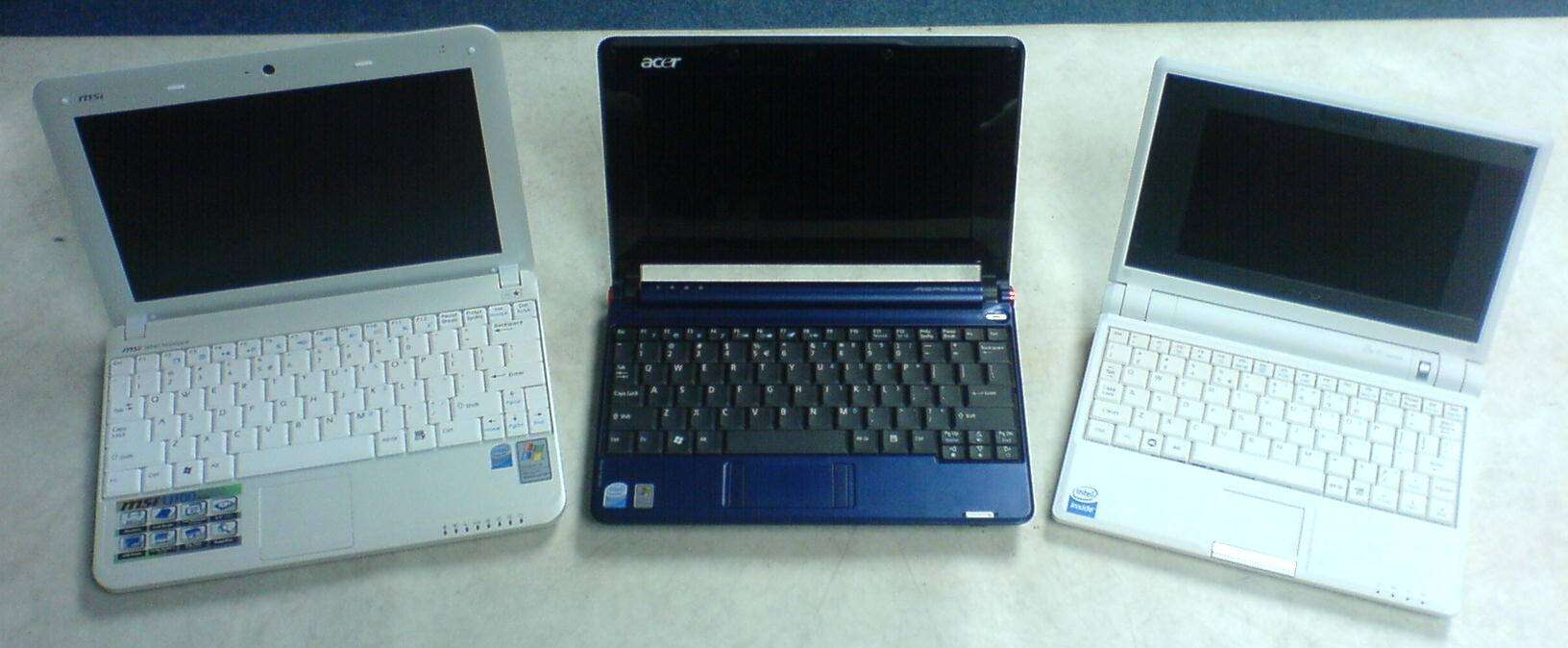
Acer Aspire One vs MSI Wind U100 vs Asus Eee PC 701
We managed to get our hands on two of the currently three available netbooks with the new Intel Atom processor, MSI Wind U100 and Acer Aspire One. We decided to compare the predecessor of them all, the Asus EEE PC 701 which came out in December 2007. Being an older and more of an experimental model, it is obvious that it is slightly out of the league, but we simply wanted you to see the difference and understand what is so revolutionary about these new models coming up.
On first look it is quite noticeable that the MSI Wind U100 is the biggest of them all, but the compromise on that is it carries a 10″ display, a nice large keyboard and they even managed to put some big air vents to carry away the excess heat. Even though the Intel Atom Processor heats much less than the Intel Celeron of the Asus EEE PC 701, MSI decided to implement their own hardcore tool even to this little guy, the Turbo Drive Engine Technology which overclocks the Intel Atom N270 from 1.6GHz to 1.9GHz (UPDATE: The Turbo Feature is no more, read on to find out more) .
The Acer Aspire One has a 8.9″ display, but that extra 1.1″ doesn’t really make a difference because it has the same resolution as the MSI 1024×600 and have in mind that mobility is the key factor we are after, so with smaller size it fits better on a train or plane table for example. Again we have large keys, with better layout than the MSI, and Acer have built-in two card readers, so you can put one 16GB SD flash card for example which will make your total space 120GB+16GB=136GB if you really need more space, and use the other card reader to transfer your pictures or any data from your camera, but I still find the lack of Bluetooth a little imprudent.