
How to Edit Facebook Comments?
In a hard times like these, when we, The Facebook addicts are so misunderstood,this new option may be a good way to prove someone wrong. Maybe not. OK, first let me introduce the long waited…
In a hard times like these, when we, The Facebook addicts are so misunderstood,this new option may be a good way to prove someone wrong. Maybe not. OK, first let me introduce the long waited…

This is the second video I forgot to upload when I got the Dell Inspiron N5010 to let you know what we are about to review. I won’t do that anymore, I promise. You can…
I know I should have posted this unboxing video before the Asus K53SV Review, but I was simply overexcited and so I forgot. So here is the unboxing video of the Asus K53SV notebook, as…
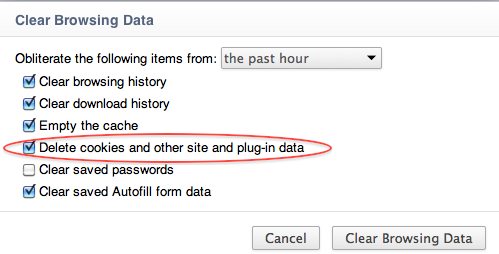
About a year ago, Google bundled Adobe Flash with the Chrome Web browser in order to make it more secure for their Chrome users. When someone wanted to clear Flash Local Shared Objects or the…

UPDATE 2018: The reviewed laptop model in this post is from 2011. If you are looking for the latest version 2018 of Dell Inspiron 15 5000 you can find it here.
Although the Inspiron line from Dell was originally intended to be an entry-level class, this notebook proves that they have started targeting the mid-class with it. The new Dell Inspiron N5010 got at our lab and we are proud to present this fine piece of craft. Of course Dell made it following the today’s standards with a fine aluminum case, equipped with a second generation Intel I5 processor and mid class ATI Mobility Radeon HD 5650, this model screams serious performance.

If you find this review helpful and want to support us and this website to continue bringing you these unpaid reviews, and if you decide to buy this notebook, it would be of great help if you buy the Dell Inspiron N5010 from Amazon
Model: Dell Inspiron N5010
The Dell Inspiron N5010 notebook again comes with either I3 I5 or I7 Intel processor, a 15.6″ 1366 x 768 LED monitor, ATI Mobility Radeon HD 5650 with 1GB DDR3 RAM, Intel® HM57 Express Chipset, Bluetooth, 3 x USB 2.0 ports, SRS Premium Speakers, 7in1 card reader, and a 6 cell battery.

It is the new feature that Google added to Google Docs, that allows uploading folders and files. This new option works in Google Chrome, and uses the new drag and drop interface. It is very…

What a clever team we have in Facebook.Not only we spend hours and hours clicking and liking something on the Social Network, uploading videos from YouTube, chatting with our friends, now we have the opportunity…

Google released the new Toolbar 7 for Internet Explorer 9. With the new personalized toolbar, Google will provide faster and cleaner search. The new toolbar has implemented the Toolbar instant feature, which provides instant search…