ATTENTION: This case/solution applies only when this error was caused by partitioning with older versions of partition software which does not support vista partitioning. Although NTFS, vista partitions are different than XP, and require specific amount of space reserved before the primary partition, so most partition software applications available at this point, do not support Vista. These include: all versions prior Acronis Disk Director Suite 10.0 build 2160, all versions prior and including Norton’s Partition Magic 8.0.. and since these two are the leaders, I shouldn’t even mention others. That’s why Vista has its own built-in tool for resizing partitions now.
This is one common problem that I see pretty often lately. It was a while ago when my girlfriend brought me her new notebook with Windows Vista installed, and she wanted to resize the partitions, because her primary c: partition was 10GB by default (some genius installed it that way). Although Vista has unfriendly interface for PC Technicians, it does have some basic but pretty useful tools built in which XP lacked, like searching online for drivers, working imaging tool, fast and useful OS repair. So I figured it must have the option built in for resizing partitions, and guess what, I was right! Right click on “My Computer” -> “Manage” and then Disk Management. All of the installed drives can be seen there. With right click on the partition I wanted to resize and I saw the new option Shrink/Extend your partition. Great, but this was somewhat confusing, I wanted to extend it, when I realized the whole hard drive was a mess, there were five different partitions on a 160GB hard drive, of which only three were formatted. So Vista’s tool wasn’t helpful here, I tried to shrink and extend a few times, but I only made it worse, and since they contained some important data, I decided to go with my standard procedure. I insert my hiren’s boot cd 9.5 and boot from it. I selected Acronis Disk Director 10 -> Manual mode. The image of the disk looked like shish kebab. It was so hard to determine what was what. I worked it out after some time, and when I was finally happy with the result I saw, I restarted my computer and boom! There it was:
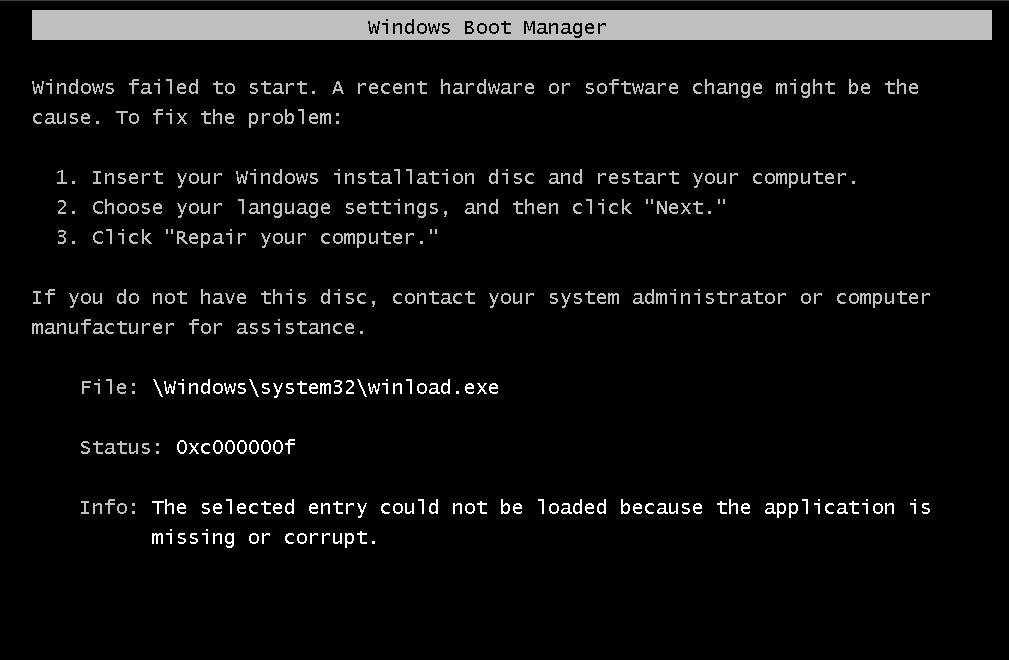
winload.exe vista The selected entry could not be loaded because the application is missing or corrupt.
File: \windows\system32\winload.exe
Status: 0xc000000f
Info: The selected entry could not be loaded because the application is missing or corrupt.
It was late at night and the notebook should have been ready until the next morning. After I woke up my neighbors with a loud lion roar I calmed myself a bit and started searching for an answer. There wasn’t a solution through-out the internet, since Vista was considerably new at the time, so the only thing it came to my mind is a repair. BUT I only had a disk from Windows Vista Home Basic without the repair menu in it and I’m not sure why, but all of the notebooks do not include a windows disk with them even when you buy it with licensed OS. So I searched around and luckily found a download for only the recovery Vista DVD:
http://ashrafmahmud.blogspot.com/2008/07/windows-vista-recovery-disk-bootable.html
or here:
http://neosmart.net/blog/2008/windows-vista-recovery-disc-download/
FIX: These are only the recovery tools from windows vista.
Burn the one which suits your Vista(32bit or 64bit) to a disc
Boot from it(restart the computer, at boot time after the logo is displayed you should press a button which is specific to every PC(usually Del, F2, F10 etc) and under the Boot Options menu, change the priority of boot devices to your CD/DVD Optical Disk.
After Vista Recovery CD is loaded choose Repair and it should detect the problem automatically. Something like: “Your windows installation requires repair” will come up to which you answer yes and you are done.
If this doesn’t work, you could try choosing Command Prompt from the repair menu and then enter these commands:
bootrec.exe /fixmbr bootrec.exe /fixboot

August 12th, 2008 at 8:58 pm
Niceone thanks, it solves alot of mysteries with the Vista partitions, I didnt know that it required empty space at the beginning of the partition in order to create a valid one.
August 17th, 2008 at 12:56 am
Your blog is interesting!
Keep up the good work!
October 25th, 2008 at 9:38 am
[...] 折腾17:vista系统依然无法启动!情况类似:http://www.technoish.com/microsoft/vista-problems/how-to-avoid-or-fix-winloadexe-corrupt-in-windows-… [...]
December 6th, 2008 at 3:25 am
thanks man you are the shit
February 15th, 2009 at 6:50 pm
It would be really nice if we could get this on a thumbdrive. I tried mounting it and then copying the files over but my computer doesn’t see it as a bootable drive still. I don’t like burning cd’s for a one time fix (just a waste) so if there is a way to get this on a thumbdrive that would be helpful…I’m a linux user mostly because of stupid windows problems like this
February 16th, 2009 at 3:17 pm
Thanks alot it solved me the booting problem … ur the man !!! ;)
February 16th, 2009 at 8:43 pm
Thank you, solved my problem.
February 19th, 2009 at 7:55 am
Jebana kurwo, ten pierdolony śmieszny tutorialek jest chuja warty, Twoja matka mogła by się nim podcierać zamiast używać do tego własnych cycków ;]
April 23rd, 2009 at 1:14 am
en 我试试看 不知道行不行啊
April 23rd, 2009 at 1:30 am
非常的感谢啊 问题解决了 哈哈 太好了 thanks very much good guy
June 4th, 2009 at 10:08 am
This worked perfect!!!! Thanks so much very good answer, and very fast fix!
June 15th, 2009 at 3:52 pm
I had the same error come up about winload.exe missing or corrupt, but it has nothing to do with partitions, as no one has done that to the computer. We have ordered a set of recovery disks, hope that fixes the problem since it is not even a 2 year old computer, barely used for only email and word processing.
June 15th, 2009 at 3:52 pm
I had the same error come up about winload.exe missing or corrupt, but it has nothing to do with partitions, as no one has done that to the computer. We have ordered a set of recovery disks, hope that fixes the problem since it is not even a 2 year old computer, barely used for only email and word processing.
June 18th, 2009 at 12:19 am
Well i have a problem. Mine is messed up really bad. I booted up Mac os and vista and xp and linx. At the end i figured out to boot it all correct but i accidentally removed my mac version and now the message comes up while i am trying to get into bootloader. I can’t access to bootrec.exe it won’t let me. Any idea on how to help me?
June 20th, 2009 at 1:34 am
[...] without much success..I’m not sure if this link may help but what the hell, you never know…. How to Avoid or Fix “winload.exe corrupt” in Windows Vista __________________ AMD PII 940GA-MA790X-DS4-NOCTUA CHIPSET COOLINGATI HD 4870 512MB @ [...]
June 20th, 2009 at 9:46 am
Thank you very much. It has solved my booting problem. Very nice work!
July 17th, 2009 at 5:16 pm
Thank you so much man, I was starting to get headaches trying to solve this problem. I was even confused at times believing that an actual recovery disk had come with my notebook when I bought it. Anyways, nice work!
August 9th, 2009 at 3:32 pm
when the cd is put in. and it does not show you have an operating system, you probably do not have your operating system set as active. Good software to do such is paragon boot cd. it will boot your computer in the worst of conditions. go to harddrive manager and you can right click your hard drive and set it back to active.
This site is wonderful. lol its a cheesy slogan at the top. BUT THE CONTENT is great.
August 25th, 2009 at 9:30 am
You saved the day! Cheers…. This works well and you deserve a bit of praise
August 27th, 2009 at 7:50 pm
how can I “under the boot options menu, change the priority of boot devices to yours cd/dved optical disk.” I dont know how to do it can you show me by some picture please?
September 17th, 2009 at 11:19 pm
We saw something like this in our corner of Michigan recently.
Can’t wait all these XP systems to start needing upgrades.
Thanks for the post.
October 22nd, 2009 at 4:41 am
Great post, man.
I’m getting the headache with this. I exactly got the same problem.
Downloading the boot DVD. Hope it’ll work. Thanks a lot
October 22nd, 2009 at 5:33 am
I get over this problem, thanks again, guy
November 3rd, 2009 at 9:54 am
Excellent blog with clear instructions. My Vista Ultimate after a clean install had the winload.exe error message and all attempts using a valid install disk failed. Only after I used the command prompt with your instructions did I success. Keep up the good work!!
November 30th, 2009 at 11:14 am
I followed these steps but the boot disk will not boot. I get the black screen loading files, then the small green bar at the bottom, then it’s a black screen and the disk stops spinning. I changed my boot order to read the cd-rom first (optical disk drive was first before) and that still didn’t help. I’ve got work files on my laptop that I desperately need to get to. I hope someone out there can help me with this. Greatly appreciated!
January 27th, 2010 at 1:34 pm
Thank you very much dude!
This was exactly my problem…
After installing a new bigger harddrive and cloning my Vista-System via Acronis TI 10 I got the above error.
Fised it using this Vista Recovery repair Image
http://download.drwindows.de/recovery/vista_recover_x86.iso
January 29th, 2010 at 3:38 pm
Didn’t work for me.
February 22nd, 2010 at 6:03 am
hmmm problem still exists. Any other help on this?
March 22nd, 2010 at 1:26 pm
Ran into this problem last night… trying to GHOST a Vista32 installation from a 160gig drive to a 250gig drive (keeping partitions same size) … found and downloaded the Vista32 Recovery CD.. and used it to “Repair” the boot problem… WORKED!… Thanks! ;)
April 1st, 2010 at 5:24 am
Hi Dude!
Thanks a lot for you info above.
I had som rundll32 problems and was changing some settings in “windowsconfig” and then I got the same screen as you….
I had no idea that it was possible to download the recoveryd CD but when I found your site everything went well!!
April 14th, 2010 at 8:33 pm
cheers bro… looked this up on my PS3 so i could only try the cmd prompts and WOW! your a genuis… it was fixed in 5 seconds =P
April 20th, 2010 at 7:11 am
Thanks for this, you’ve saved my sanity …
I’d bought a recovery program (success guaranteed) which didn’t work. I then found this advice, which I followed with a completely successful outcome.
thanks again.
May 17th, 2010 at 1:00 pm
will this work in windows 7? if not, what should i do about it?
July 1st, 2010 at 10:12 pm
I have the same error “winload.exe missing or corrupt” but in my case it can’t be because of partitioning because I don’t have any partitions. Do you have any idea what else could be causing this problems because I have been searching the internet for hours and I can’t seem to fix it. I’m getting a little desperate!
July 6th, 2010 at 7:45 pm
gosh i’ll gonna try this one…
August 29th, 2010 at 1:28 pm
Wow this really works!!!Just copy the 2 commands 1 by 1 then, restart ur computer and problem solve. This is 1 of 100 websites that solvess this problem!!! Actully only website that has it. Thank U Technoish.com!!!
September 2nd, 2010 at 7:40 am
big big help thx allot, on the 2nd web there is idd a recovery iso witch u shud burn on a cd insert and problem solved